
Map browsing with the MindManager Map Explorer Add-in


Thanks to the MindManager User forum RSS Feed I discovered Mindjet Labs have released a free Map Explorer Add-in for MindManager Pro 6.
This wish, originally suggested in the forum by “Wallace”, has been granted which just shows that Michael S. Scherotter (Product Manager, Solution Platforms, Mindjet) is far more productive on long haul flight than I am. I just watch movies, read, eat or sleep!
The Map Explorer adds a pane to the MindManager Interface showing the current map as a navigable hierarchical tree. It also allows basic topic editing enabling rename/delete of the current topic and insert of sub-topics, siblings, call-outs or floating topics within the Explorer Pane. The Map expands to show the topic selected in the Explorer view and, if not visible at the zoom level, pans to the topic.
It’s a nice way to browse a complex map and I thought could be handy to use in Presentation Mode. Unfortunately by default this mode hides the Toolbars & Task Panes but you can restore them using the Options Button > Toolbar settings in Presentation Mode;
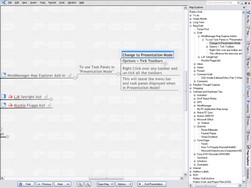 To enable Task Panes in "Presentation Mode"
- With a map open change to Presentation Mode
- Click the Options Button > Tick Toolbars
- Right Click over any Toolbar and un-tick all the toolbars
- This will leave just the slim menu bar at the top and task panes displayed when in Presentation Mode!
Adding Explorer to the existing Map and Outline Modes in MindManager gives a very versatile interface to access and manage complex information. Thanks to Wallace, Michael and long-haul air travel!
Get the MindManager Map Explorer at: http://www.mindjet.com/labs/MapExplorer.html
UPDATE 25–06–2006: Jason Dorko discovered a limitation for Tablet users. The Map Explorer view doesn’t display, or try to recognise, inked topics. See his Map Explorer post for details.
UPDATE 22–07–2006: Jason will be happy, now supports ink!