
Autodesk Design Review 2010 and MindManager, the ribbons nest!
A recent email regarding MindManager + Autodesk Design Review (ADR) had me looking for this post on my blog only to find I'd never published it! Some time ago Last year I posted how MindManager can...

A recent email regarding MindManager + Autodesk Design Review (ADR) had me looking for this post on my blog only to find I'd never published it!
Some time agoLast year I posted how MindManager can use Autodesk Design Review (ADR) in its integrated browser pane. This enables you to review a design DWF in context with project notes made in a MindManager map. The detail of how the two applications interact hasn't really changed but ADR 2010's ribbon interface makes it slicker. The previous ADRs opened a mass of toolbars (below). You could customise this (with saved workspaces) but then had to change workspaces or toggle toolbars to get them back.
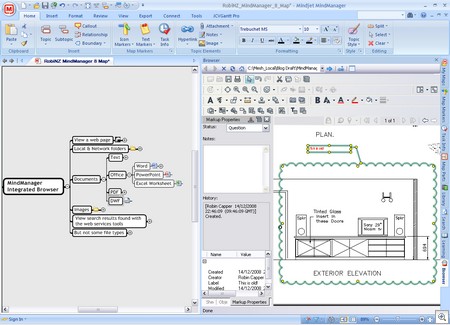
With 2010 the ribbon opens minimised for optimal viewing space. View related tools on the canvas bar and right click menus function as normal for basic review/print tasks.

You can expand the ribbon for more tools allowing a nested "Ribbon in a Ribbon" User Interface. I guess this is a form of living hell for those who don't like the ribbon but for me it beats a scramble of toolbars!

It's more consistent (they don't move around or disappear) and much better for use with a pen. The Tablet PC is my favourite platform for Autodesk Design Review mark-up, in spite of no "real ink". It's close to hand mark-up in feel & speed but retains all the advantages of digital work.

The last ribbon tab is rather sparse but not one I visit often when in embedded mode. If a session involves snapshots or 3D section/move tools I tend to open the full interface, just a click on the MindManager toolbar does that!

Ribbons within ribbons, where will it end!