Windows 7 - Are there between 6 and 9 Windows on your taskbar?
A recent post on the Engineering Windows 7 blog reveals how Windows users use windows. They'll typically have 1(!) to 14 windows open with most having 6-9 "peak windows". That surprised me, as it s...

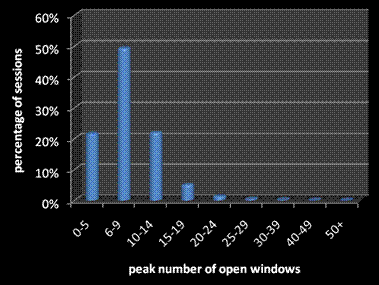
A recent post on the Engineering Windows 7 blog reveals how Windows users use windows. They'll typically have 1(!) to 14 windows open with most having 6-9 "peak windows". That surprised me, as it seems a lot, but then I thought about my typical work scenario;
- Design Applications (at least one,often several at once);
- Revit Architecture and/or Revit MEP
- AutoCAD Architecture and/or AutoCAD MEP
- Business/Management Applications;
- Outlook + Email Editor
- MindManager
- Excel and/or Access
- Explorer Windows; 1 - 3 typically
- RSS Bandit (Feeds & Net browsing) and/or Internet Explorer (Intranet mostly)
- Utilities, intermittent windows;
That's at least 6, often 9 and sometimes more windows so it seems I'm just average. While the post is about how the Start Menu, Taskbar & switching presents windows I think the OS could help in other ways.
A tabbed interface for Windows Explorer - along the lines of IE - would reduce the number of Windows generated by simple file/folder browsing. There are many Explorer alternatives. I've tried a few but never stuck with any of them but possibly because I don't use the conventional shortcut/folder navigation very often. My common folders are just an ActiveWord away and I tend to use my MindManager "Dashboard" to access project specific folders. Because Explorer doesn't re-use open windows they just pile up until I get around to closing them.
I remember reading a justification for Explorers current behaviour way back in Windows 95 days but surely the game has moved on since then? Explorer hasn't changed much over the years so I hope Windows 7 will improve file/folder management.
If you're curious about the - sometimes apparently arcane - rational behind the development of an operating system the Engineering Windows 7 blog is worth following.
Engineering Windows 7 : User Interface: Starting, Launching, and Switching
Where to Start? In this post, Chaitanya Sareen, a senior program manager on the Core User Experience team, sets the engineering context for the most frequently used user-interface elements in Windows...
Engineering Windows 7 : User Interface: Starting, Launching, and Switching
Where to Start? In this post, Chaitanya Sareen, a senior program manager on the Core User Experience team, sets the engineering context for the most frequently used user-interface elements in Windows...
Image credit Microsoft EW7 Blog
Image credit Microsoft EW7 Blog