
Time to put your business on the map?

Hobie, at Mindjet, sent me a couple of links to a Computer World article on mind mapping which demonstrate it has value beyond the traditional uses; brainstorming and meetings.
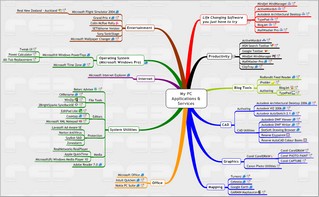
In fact, I’ve only occasionally used MindManager for that as have more use for it as a “knowledge manager”. If a task requires more than immediate action I invariably start by adding it to my “map central”. This contains links to everything I use during the typical day. The topic grows, gathering notes, links and other resources, as the task evolves. This can be anything from a quick response email to a technical fault to more involved Projects, Systems and Documentation. If the task becomes complex, or is a long term project, I’ll export it to a separate map leaving just a link at “map central”. This gives a clean summary of current activity with the full detail only a click away.
The advantage maps have over linear “To Do Lists” or more formal project databases is they are:
 Organic; You aren’t locked into a formal structure unless you choose to be.
- Easy and fast to edit;
- Enter or insert to add topics
- Drag ‘n drop to add detail; folder/file links, hyperlinks,
- Add notes with rich content, images, tables and links.
- Add topic images and status icons.
- Quick to navigate, you collapse/expand detail in a click
- Rapid to review;
- I find you can scan a map and find the detail you need far more rapidly that a list. Closest is an Outline List, where you can expand/collapse topics, but then the map adds spatial cues that don’t exist with an outline.
- You need only expand the branches where you want more detail
- Colour, icons and images provide visual cues and can be used to filter the view.
- Easy to share as a Map, Website, Image or Office formatted document export.
If you’d like to try it, view the map (image above right) (requires a free MindManager Viewer) then try the List (Word doc format) which was exported from it. Both convey the same information but I know which I prefer.
Why not add “Try Mapping” to the top of your “To Do List”, it might be the last item ever added, or make it the first topic on your To Do Map

Business on the map: Mind-mapping tools are finding a home in corporate IT - www.computerworld.com
Mind-mapping tools make inroads into corporate IT as they streamline problem-solving and help structure tasks.
Business on the map: Mind-mapping tools are finding a home in corporate IT - www.computerworld.com
Mind-mapping tools make inroads into corporate IT as they streamline problem-solving and help structure tasks.
Mind maps provide a view for collaboration - www.computerworld.com
Capturing results with MindManager, says Smith, allows his team to review the tests from a high-level view and develop a systemic understanding of the problem.
"It's much easier for everyone to visually scan [efforts and results] rather than plow through long reports," says Smith. "Linear tools don't really capture relationships the way mapping does."
Mind maps provide a view for collaboration - www.computerworld.com
Capturing results with MindManager, says Smith, allows his team to review the tests from a high-level view and develop a systemic understanding of the problem.
"It's much easier for everyone to visually scan [efforts and results] rather than plow through long reports," says Smith. "Linear tools don't really capture relationships the way mapping does."