
The Revit Clinic - The doctor is in, but can he help?
A new Autodesk blog - The Revit Clinic - promises to help cure, or prevent, sick BIMs. I look forward to following Harlan's blog but wonder what he'd make of some of my Revit problems. Most are not Re...

A new Autodesk blog - The Revit Clinic - promises to help cure, or prevent, sick BIMs. I look forward to following Harlan's blog but wonder what he'd make of some of my Revit problems. Most are not Revit's fault as relate to flip-flopping between different, but similar, applications expecting things to work the same. Usually I realise the real problem is the nut in front of the keyboard before anyone else does but the first case escalated to a "Stupid question of the day" call to our dealer support* before resolution!
1) Thickness that isn't thick enough results in "thickness"...
When adding a finish layer to a wall I tap in 1 (mm) and hit OK. The cryptic "Face layers must have a thickness" message pops up. The nut in front of the keyboard thinks; "1 is a thickness, I'm sure I've done finish layers that thickness before? Is this new in 2009? What's going on? Is there some other thickness, other than operator thickness?". I had a look in the help, the Discussion Groups and my own notes but ended up making the call.
The answer (thanks Nik!) was that 1mm is under Revit's "1/8" limitation as the Help clearly states. It's in the topic "Layer Assignment Rules" which is on "display" in the "bottom of a locked filing cabinet stuck in a disused lavatory with a sign on the door saying Beware of the Leopard." Additionally, this lavatory is in a dark basement that happens not to be equipped with stairs. Oops, strayed into a bit of Hitchhiker's Guide there!
Anyway, it's odd that the help mentions "1/8" or 4 mm" minimum yet the dialog seems to accept values down to about 1.6 mm before complaining. Why can't the resulting error message just say "1/8" or 4 mm" minimum thickness required" instead of "must have thickness" then you, I, wouldn't need to find the help?
It's been a while since I'd made this sort of content but was sure had not encountered it. The reason, last time was in AutoCAD Architecture which will accept any Thickness value for a component...
2) Clicking Copy results in a Copy, but not in Revit....
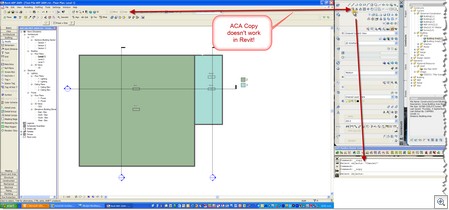
Put this down to old habits, dual screens and a brain dead operator. I want to copy something in Revit, so hit the copy tool. However I picked the one on the AutoCAD Architecture Dashboard** which resulted in a copy, but not the result I required! Sometimes it's disabling the old code in the head that's the problem!
3) Formulas, the hard way;
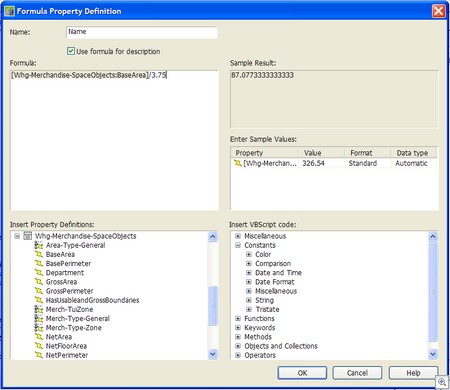
I struggle creating Formulas, entering parameter names, in Revit. It's not how they work but rather the tedious interface for creating them. I just noticed Revit MEP allows you to pick a formula name where as Revit Architecture still forces you to type them. Then I go back to AutoCAD Architecture which has this dialog where you can build and test formulas before committing to them. Maybe something for Revit to consider next year?
Old habits die hard, is there a Psychologist in The Revit Clinic?
The Revit Clinic - http://revitclinic.typepad.com
The Revit Clinic - http://revitclinic.typepad.com
"Welcome to the Revit Clinic. My Name is Harlan Brumm and I am the Global Technical Lead – Revit for Autodesk Product Support and I will be the primary contributor to this blog"
"Welcome to the Revit Clinic. My Name is Harlan Brumm and I am the Global Technical Lead – Revit for Autodesk Product Support and I will be the primary contributor to this blog"
"Where do you go when you have a physical problem?, A Doctor. Where do you go when you have a BIM problem? Well, I’m not a doctor, but I hope that you will start to come here. I will be focusing this blog on the Autodesk Revit platform of Products, Revit Architecture, Structure, and MEP and trying to prevent BIM problems and provide you rehab if they happen"
"Where do you go when you have a physical problem?, A Doctor. Where do you go when you have a BIM problem? Well, I’m not a doctor, but I hope that you will start to come here. I will be focusing this blog on the Autodesk Revit platform of Products, Revit Architecture, Structure, and MEP and trying to prevent BIM problems and provide you rehab if they happen"
* Stupid questions of the day are not daily, but are stupid!
** Yes that does mean we are still using AutoCAD Architecture 2008. I was waiting till 2009 Update 1 before switching over, now I'm trying to find the time to deploy it!