
My perfect computer - Part 2 - Can I just have a proper button?
First I must say, I really like my (work provided) HP 8710w mobile workstation. It's not a Tablet PC, which I'd like added , but the performance, screen and keyboard - especially the proper number...

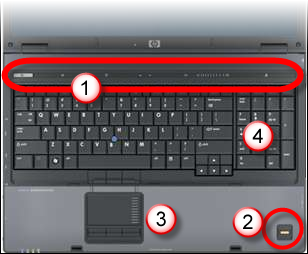
First I must say, I really like my (work provided) HP 8710w mobile workstation.
It's not a Tablet PC, which I'd like added, but the performance, screen and keyboard - especially the proper number pad (4) - impress. It has a good touch pad with scroll (3) and the fingerprint scanner (2) works OK but sometimes gets in the way, with false scans, depending how you use the keyboard. That could be fixed by moving it above the keyboard, or the side of the screen like our HP 2710 Tablet, but it's not a big deal.
There is one part that I have grown to dislike and working with an old machine today reinforced that view.
I'm not in touch with this:
The control strip (1) has only one real, physical, button which turns the machine on & off. There are seven other controls and indicators including my nemesis, the volume control.
Controls and status indicators, why mix them up?
The status bar controls toggle wireless, launches helper applications and mute/adjusts the sound. There are also indicators for caps and number lock which, although they look like controls & light up the same, do not control these. You do that from the keyboard but why not both?
Any volume you like, except the one you want:
The mute & volume controls are where it goes wrong. When not active all the controls are light grey making them hard to see. Ever tried muting a PC as it boots in a dimly lit conference/meeting when the control is a grey symbol somewhere on a strip with no tactile feedback?
Volume is a touch sensitive strip which pops a similarly styled on screen display as you adjust it. You alter volume by touching the control but I find it hard to get the level you want. It's really very easy to get a volume you don't want, but mine has started denying me the top third of the scale entirely (it won't go past there). Then every time you adjust the volume the pop-up screen display appears. HP have helpfully, on XP at least, made it kick many web media players (like YouTube) out of full screen mode, which is just brilliant.


Older, better, with buttons:
What prompted this was using an old HP laptop. There are the same controls, in the same place with simple old buttons, which work! Each click of a button, you could locate by touch, gave an incremental change in volume, it's marvellous. The control strip might look sleeker, and I bet it's cheaper to make, but it's one part of an otherwise lovely machine that really annoys me.
UPDATE 2009-04-11: Since I wrote this the display for volume only goes to 3/4. Don't knpw if it's the stupid touchy control or the display.