
MindManager Checklists

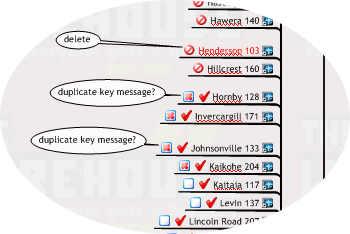
One thing I’ve found MindManager really useful for is checklists when doing tasks that involve many steps or files.
Today I had to export data from 80 CAD files to Mdb Database. I needed to add some new properties and check each file was working so could not automate it.
The data export process takes about 5–10 minutes per file but uses only a portion of the processor performance so I leave it running in the background while doing other work. The downside of this is that you are flipping back to complete the last job and start the next while doing several other things.
This means some way of tracking where you are at is important. I used to do this with a paper list but find MindManager is better.
Dragging the files required into MindManager Map quickly forms a list complete with a file Hyper-link Icon

which makes it easy to open each file. One click and you’re there irrespective of where the actual file is located. I added

icons to indicate which files were required (this time) and

progress icon to track completed files. Call-outs highlight any files that I’ll need to check after the initial export is complete.
Looking at the map example above you can see how easy it is to review the status of the task. The list is also reusable as you can easily reset the status icons. MindManager makes a great process checklist