A Media Player tip from the dept of stupid...
It was a boring task made tolerable by listening to podcasts*. I had to open a bunch of files, check the xrefs were loaded OK (very old content), publish a DWF of selected sheets and export the file t...

It was a boring task made tolerable by listening to podcasts*. I had to open a bunch of files, check the xrefs were loaded OK (very old content), publish a DWF of selected sheets and export the file to AutoCAD with xrefs bound, AEC objects exploded. I couldn't automate it because variations in the content, and occasional path repairs, meant each file had to be visually checked. As I worked I got frustrated by the little media player info window popping up if I moused near the controls on the AutoCAD Architecture status bar and covereing them.
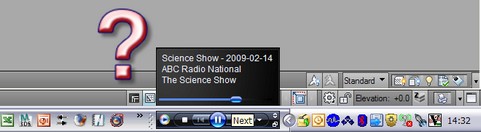
It only took a few hours to realise I could just move the Media Player Taskbar control to the other side of my Quick Launch bar, well clear of any AutoCAD controls..

* I like working listening to podcasts, rather than radio or music, as you can stop/start them as required and not miss anything. I listen to all sorts of content but favourites include John Safran & Father Bob, Dr Karl, Skepticality and BBC Comedy. Eagle eyed readers might notice when I took the second screen shot I was listening to some guy in Florida raving about Revit while AutoCADing

. Just to show my stupidity isn't platform specific I have a dept of stupid Revit post to share in the future...